Artur Mukhamadiev
4f21e2ea38
Artur Mukhamadiev
4f21e2ea38
- Configure StereoSGBM with P1/P2 penalties, 5x5 block, uniqueness ratio,
  speckle filter and left-right check; previously it ran unregularised and
  produced a heavy tail of low-disparity outliers reprojecting metres away
  (SCARED benchmark MAE3D 44 mm -> 0.8 mm, RMSE 289 mm -> 1.4 mm)
- Pass the requested disparity count to the CUDA SGM matcher (rounded to
  64/128/256) instead of a hard-coded 16
- Add optional `cloud_point` config section (algorithm, num_disparities,
  depth range) consumed by CLI options 4/5; ship config.scared.yml
- write_ply now emits a binary PLY with a grid-triangulated mesh so web
  viewers stop fabricating slivers from consecutive vertices
- Add config, matcher and PLY export tests; document in README
Cloud Point RPC
Communication JSON RPC protocol and implementation with Unity Scene.
Project Structure
include/: Header files for the RPC server, TCP server, and C-API.src/: Implementation of the RPC logic, networking, and C-API.src/cloud_point/: OpenCV-based image processing and rectification logic.docs/: Documentation diagrams and models.subprojects/: Dependencies managed by Meson.
Status
- Server implementation with C-API for Unity
- OpenCV stereo client (StereoRectifier, PointCloudBuilder, CloudPointClient facade)
- Unity-side C# implementation per docs/unity-integration.md
API Documentation
See API.md for detailed request/response formats.
Pipeline
Unity acts as a data source: it serves stereo image pairs (get-image-pair) and full stereo calibration (get-stereo-calibration) over JSON-RPC 2.0. The C++ CloudPointClient calls connect() once to fetch calibration, then on each compute_cloud() call it fetches a synchronised image pair, runs stereo rectification (StereoRectifier, cv::stereoRectify + remap), computes disparity with SGBM (16× scaling), reprojects to 3-D with cv::reprojectImageTo3D (PointCloudBuilder), filters NaN/invalid points, and returns a PointCloud. An optional write_ply() helper serialises the result to disk.
See API.md for wire schemas and docs/unity-integration.md for the Unity C# design spec.
Development
The project uses Meson build system and C++23.
Dependencies
- Meson (>= 1.1.0), Ninja
- GCC/Clang (C++23 support)
- Git (for subprojects)
- OpenCV 4 (optional; required for stereo point cloud compute)
The following dependencies are managed via Meson subprojects:
- ASIO (Networking)
- nlohmann/json (JSON serialization)
- yaml-cpp (Configuration loading)
- glog (Logging)
- jsonrpccxx (JSON-RPC 2.0 implementation)
Build & Run
meson setup build
meson compile -C build
./build/src/cloud_point_rpc_server config.yaml
Note: You need a config.yaml file. See config.yaml.example for the required format.
Run the interactive CLI client:
./build/src/cloud_point_rpc_cli config.yaml
CLI menu options (OpenCV options are hidden when built without opencv4):
| Option | Action |
|---|---|
| 1 | List available RPC methods |
| 2 | Get intrinsic params (legacy) |
| 3 | Get extrinsic params (legacy) |
| 4 | Compute point cloud — prints point count and bounding box |
| 5 | Compute point cloud and save to output.ply |
| 0 | Exit |
Build on windows
It's assumed that you have GCC and make/ninja installed on your system (and available in PATH)
## FIRST OF ALL!
git submodule init
git submodule update
# Next python:
python3 -m venv .\venv
.\venv\Scripts\Activate.ps1
# or
.\venv\bin\Activate.ps1
pip install meson cmake
meson setup -Ddefault_library=static build
meson compile -C build
# To correctly get dlls:
meson devenv -C build
## .\build\tests\unit_tests < for dummy test
## .\build\src\.. < produced execs and libs
Testing
meson test -C build -v
Docker
You can build and run the cli using Docker.
1. Build Image
docker build -t cloud-point-rpc .
2. Run Container
The cli will try to connect to a running server on ip and port defined in config.yml file. (defined in config.yaml inside the image).
For simplicity, it's better to use a host network, so you will not have any headache with accessability.
Server is not configured to run through container, if you need, contact me
You also can mount your own config.yaml to override the default settings:
docker run --network=host -it -v $(pwd)/my_config.yaml:/app/config.yaml cloud-point-rpc
Validation with SCARED Dataset
The scared_dataset_server executable lets you validate the stereo point-cloud
pipeline against real endoscopic images from the
SCARED dataset.
Obtaining the data
- Download
test_dataset_8.zipfrom https://huggingface.co/datasets/maxhallan7/scared. - Extract so that
keyframe_0/throughkeyframe_4/exist undertest_dataset_8/.
Each keyframe directory contains:
Left_Image.png,Right_Image.png— 1280×1024 unrectified RGBA images.endoscope_calibration.yaml— OpenCV FileStorage withM1,D1,M2,D2,R,Tnodes.
Note: T is stored in millimetres in the YAML file (baseline ≈ −4.35 mm).
scared_dataset_server divides T by 1000 before placing it on the wire
(the wire protocol uses metres).
Running the server
./build/src/cloud_point/scared_dataset_server \
    /path/to/test_dataset_8/keyframe_0 8080
If port 8080 is already taken on your machine (Docker's rootlesskit
commonly holds it) pass another port and update server.port in the CLI
config accordingly. Connecting the CLI to a foreign service on 8080 shows up
as invalid JSON response from server / std::bad_alloc errors.
Connecting with the CLI
In a second terminal run the interactive CLI with the SCARED-tuned config:
./build/src/cloud_point_rpc_cli config.scared.yml
# Option 4 — compute point cloud and print valid point count + bounding box
# Option 5 — compute point cloud and save a triangulated PLY mesh
config.scared.yml sets the optional cloud_point section that options 4/5
honour:
cloud_point:
  algorithm: cpu        # "gpu" falls back to CPU when CUDA is unavailable
  num_disparities: 160  # fx ~1024 px, baseline ~4.35 mm -> up to ~160 px
  min_depth_m: 0.02     # endoscopic working range: 20 mm .. 300 mm
  max_depth_m: 0.30
Depth limits are a physical bound on the scene: with this rig depth is
roughly 4.45 m / disparity_px, so any mismatch with a disparity below
~15 px reprojects metres away. Without the section the CLI falls back to the
generic defaults (GPU, 128 disparities, 0.01–10 m). The SGBM matcher itself
is configured with OpenCV's recommended smoothness penalties (P1 = 8·bs²,
P2 = 32·bs²), a 5×5 block, uniqueness ratio 10, speckle filtering and a
left-right consistency check; see CpuStereoMatcher::Params.
Checking the result
Option 4 should report a bounding box with z inside roughly
[0.03, 0.16] m for test_dataset_8 keyframes. Option 5 writes a binary
little-endian PLY containing every valid point and a mesh triangulated
from the pixel grid (triangles are dropped where the longest edge exceeds 5 % of the local
depth, so the mesh breaks at occlusions). The mesh is what makes web viewers
usable: viewers such as Meshy's online PLY viewer fabricate a triangle from
every three consecutive vertices of a vertex-only PLY, which draws long
slivers across the surface and makes a correct cloud look like a fan of
rays. Pass PlyOptions{false, 0.0f, false} to write_ply for a points-only ASCII
file.
When the keyframe contains point_cloud.obj, run the benchmark to compare the
reconstruction with its pixel-aligned XYZ ground truth:
./build/src/cloud_point/scared_dataset_benchmark \
    /path/to/test_dataset_8/keyframe_0 160
The benchmark reports coverage, component-wise and 3-D errors, threshold
accuracy, and matching/reconstruction timings as JSON. OBJ coordinates are
converted from millimetres to metres and rectified into the same left-camera
frame as the reconstructed cloud before evaluation. Reference numbers for
dataset_1/keyframe_1 with the tuned SGBM configuration: coverage ≈ 0.85,
MAE₃D ≈ 0.8 mm, RMSE₃D ≈ 1.4 mm, 80 % of points within 2 mm (the previous
unregularised SGBM gave MAE₃D ≈ 44 mm and RMSE₃D ≈ 289 mm).
The E2E test (tests/test_scared_dataset.cpp) exercises the same pipeline
with num_disparities = 160 and asserts >50 000 valid points and a median
depth in [0.02, 0.20] m.
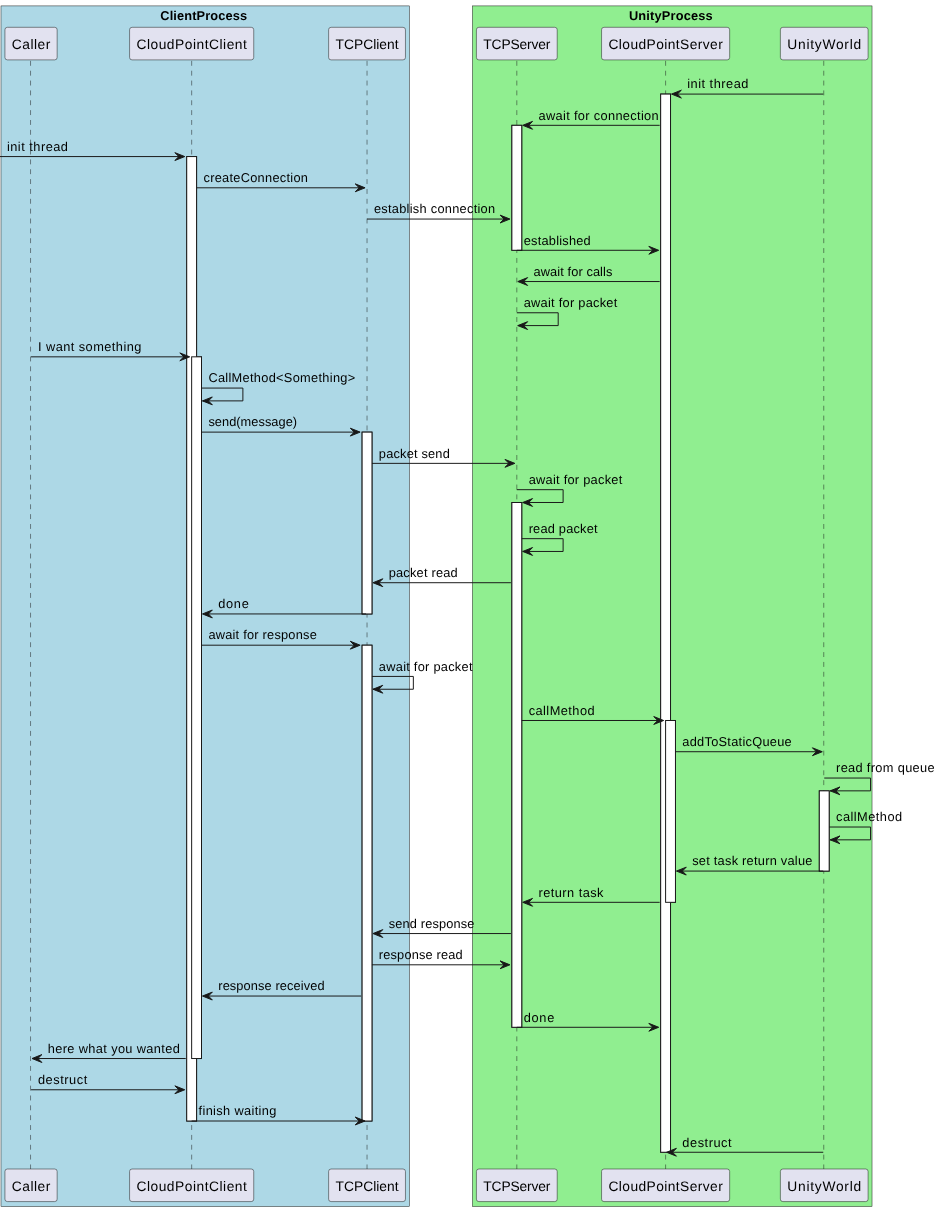
Communication model