Artur Mukhamadiev
2016b14f91
Artur Mukhamadiev
2016b14f91
Cloud Point RPC
Communication JSON RPC protocol and implementation with Unity Scene.
Project Structure
include/: Header files for the RPC server, TCP server, and C-API.src/: Implementation of the RPC logic, networking, and C-API.src/cloud_point/: OpenCV-based image processing and rectification logic.docs/: Documentation diagrams and models.subprojects/: Dependencies managed by Meson.
Status
Done:
- Server implementation with C-API for Unity
- OpenCV stereo client (StereoRectifier, CPU/GPU matchers, PointCloudBuilder, CloudPointClient facade)
- Tuned SGBM for the SCARED rig (P1/P2 penalties, uniqueness, speckle, LRC) and depth-range clipping
- Binary PLY export with grid triangulation and
ply_stridedecimation - Optional WLS / median disparity post-filters (
wls_filter,CpuStereoMatcher::Params) - SCARED benchmark with ground-truth metrics, depth PNGs and
scripts/scared_overview.py - Unity-side C# implementation per docs/unity-integration.md
To do:
- Remove sliver triangles at the border of the valid region (long spikes are still visible in
shaded viewers at
ply_stride: 4because 5 % of local depth allows 3 mm edges) - Visually compare raw vs WLS meshes in a shaded web viewer and decide the visualisation default
- Expose the remaining
CpuStereoMatcher::Params(block size, uniqueness, speckle, median kernel, WLS lambda/sigma) in the YAMLcloud_pointsection - Validate the CUDA
StereoSGMpath on a GPU machine (currently only exercised via CPU fallback) - Reduce sub-pixel SGBM noise without the WLS accuracy loss (e.g. bilateral or guided filter on depth)
API Documentation
See API.md for detailed request/response formats.
Pipeline
Unity acts as a data source: it serves stereo image pairs (get-image-pair) and full stereo calibration (get-stereo-calibration) over JSON-RPC 2.0. The C++ CloudPointClient calls connect() once to fetch calibration, then on each compute_cloud() call it fetches a synchronised image pair and runs the stages below.
| Stage | Class | Algorithm |
|---|---|---|
| Rectification | StereoRectifier |
cv::stereoRectify + initUndistortRectifyMap/remap; also yields the Q reprojection matrix |
| Disparity (CPU) | CpuStereoMatcher |
cv::StereoSGBM (semi-global block matching, MODE_SGBM, 16× fixed point) with optional median blur or cv::ximgproc WLS post-filter |
| Disparity (GPU) | GpuStereoMatcher |
cv::cuda::StereoSGM (MODE_HH4, 64/128/256 disparity levels); default, falls back to CPU without CUDA |
| Reprojection | PointCloudBuilder |
cv::reprojectImageTo3D with Q, then rejects disparity ≤ 0, OpenCV sentinels and depth outside [min_depth_m, max_depth_m] |
| Export | write_ply |
Binary little-endian PLY with grid triangulation (edges ≤ 5 % of local depth) and optional stride block averaging |
StereoMatcherFactory picks the matcher from CloudPointConfig::algorithm and forwards CpuStereoMatcher::Params. Depth follows z = fx·B / disparity; on the SCARED rig that is about 4.45 m / disparity_px, which is why the disparity range and depth limits in config.scared.yml matter.
See API.md for wire schemas and docs/unity-integration.md for the Unity C# design spec.
Development
The project uses Meson build system and C++23.
Dependencies
- Meson (>= 1.1.0), Ninja
- GCC/Clang (C++23 support)
- Git (for subprojects)
- OpenCV 4 (optional; required for stereo point cloud compute)
The following dependencies are managed via Meson subprojects:
- ASIO (Networking)
- nlohmann/json (JSON serialization)
- yaml-cpp (Configuration loading)
- glog (Logging)
- jsonrpccxx (JSON-RPC 2.0 implementation)
Build & Run
meson setup build
meson compile -C build
./build/src/cloud_point_rpc_server config.yaml
Note: You need a config.yaml file. See config.yaml.example for the required format.
Run the interactive CLI client:
./build/src/cloud_point_rpc_cli config.yaml
CLI menu options (OpenCV options are hidden when built without opencv4):
| Option | Action |
|---|---|
| 1 | List available RPC methods |
| 2 | Get intrinsic params (legacy) |
| 3 | Get extrinsic params (legacy) |
| 4 | Compute point cloud — prints point count and bounding box |
| 5 | Compute point cloud and save to output.ply |
| 0 | Exit |
Build on windows
It's assumed that you have GCC and make/ninja installed on your system (and available in PATH)
## FIRST OF ALL!
git submodule init
git submodule update
# Next python:
python3 -m venv .\venv
.\venv\Scripts\Activate.ps1
# or
.\venv\bin\Activate.ps1
pip install meson cmake
meson setup -Ddefault_library=static build
meson compile -C build
# To correctly get dlls:
meson devenv -C build
## .\build\tests\unit_tests < for dummy test
## .\build\src\.. < produced execs and libs
Testing
meson test -C build -v
Docker
The Dockerfile builds a development environment image only: toolchain
(GCC, Meson, Ninja, CMake), git for the Meson subprojects and OpenCV 4 with
contrib modules. Nothing is compiled at image build time. The source tree is
bind-mounted into the running container and compiled there, so edits on the
host are picked up immediately and the build artefacts land in your checkout.
1. Build the environment image
docker build -t cloud-point-rpc-dev .
2. Start the container with the source mounted
docker run -d --name cprpc-dev --network=host -v "$(pwd)":/app cloud-point-rpc-dev
The container idles (tail -F /dev/null); --network=host lets the CLI
reach a server running on the host and lets the server be reached from Unity.
3. Build and run inside the container
docker exec -it cprpc-dev meson setup build-docker
docker exec -it cprpc-dev meson compile -C build-docker
docker exec -it cprpc-dev meson test -C build-docker
docker exec -it cprpc-dev ./build-docker/src/cloud_point_rpc_cli config.yml
Use a dedicated build directory such as build-docker: Meson stores absolute
compiler paths, so a build directory configured on the host cannot be reused
inside the container and vice versa. With rootless Docker the container's
root maps to your host user, so build-docker/ stays owned by you; with a
rootful daemon add --user "$(id -u):$(id -g)" to docker run to avoid
root-owned build files.
Validation with SCARED Dataset
The scared_dataset_server executable lets you validate the stereo point-cloud
pipeline against real endoscopic images from the
SCARED dataset.
Obtaining the data
- Download
test_dataset_8.zipfrom https://huggingface.co/datasets/maxhallan7/scared. - Extract so that
keyframe_0/throughkeyframe_4/exist undertest_dataset_8/.
Each keyframe directory contains:
Left_Image.png,Right_Image.png— 1280×1024 unrectified RGBA images.endoscope_calibration.yaml— OpenCV FileStorage withM1,D1,M2,D2,R,Tnodes.
Note: T is stored in millimetres in the YAML file (baseline ≈ −4.35 mm).
scared_dataset_server divides T by 1000 before placing it on the wire
(the wire protocol uses metres).
Running the server
./build/src/cloud_point/scared_dataset_server \
    /path/to/test_dataset_8/keyframe_0 8080
If port 8080 is already taken on your machine (Docker's rootlesskit
commonly holds it) pass another port and update server.port in the CLI
config accordingly. Connecting the CLI to a foreign service on 8080 shows up
as invalid JSON response from server / std::bad_alloc errors.
Connecting with the CLI
In a second terminal run the interactive CLI with the SCARED-tuned config:
./build/src/cloud_point_rpc_cli config.scared.yml
# Option 4 — compute point cloud and print valid point count + bounding box
# Option 5 — compute point cloud and save a triangulated PLY mesh
config.scared.yml sets the optional cloud_point section that options 4/5
honour:
cloud_point:
  algorithm: cpu        # "gpu" falls back to CPU when CUDA is unavailable
  num_disparities: 160  # fx ~1024 px, baseline ~4.35 mm -> up to ~160 px
  min_depth_m: 0.02     # endoscopic working range: 20 mm .. 300 mm
  max_depth_m: 0.30
  ply_stride: 1         # option 5: 4 = 16x smaller, block-averaged mesh
  wls_filter: false     # true = smoother mesh for viewers, less accurate
Depth limits are a physical bound on the scene: with this rig depth is
roughly 4.45 m / disparity_px, so any mismatch with a disparity below
~15 px reprojects metres away. Without the section the CLI falls back to the
generic defaults (GPU, 128 disparities, 0.01–10 m). The SGBM matcher itself
is configured with OpenCV's recommended smoothness penalties (P1 = 8·bs²,
P2 = 32·bs²), a 5×5 block, uniqueness ratio 10, speckle filtering and a
left-right consistency check; see CpuStereoMatcher::Params.
Checking the result
Option 4 should report a bounding box with z inside roughly
[0.03, 0.16] m for test_dataset_8 keyframes. Option 5 writes a binary
little-endian PLY containing every valid point and a mesh triangulated
from the pixel grid (triangles are dropped where the longest edge exceeds 5 % of the local
depth, so the mesh breaks at occlusions). The mesh is what makes web viewers
usable: viewers such as Meshy's online PLY viewer fabricate a triangle from
every three consecutive vertices of a vertex-only PLY, which draws long
slivers across the surface and makes a correct cloud look like a fan of
rays. Pass PlyOptions{false, 0.0f, false} to write_ply for a points-only ASCII
file.
Surface roughness vs accuracy. SGBM's sub-pixel disparity noise
(~0.2 px, correlated over several pixels) is ~1 mm of depth on this rig,
far more than the 0.07 mm lateral pixel pitch, so a mesh built from the raw
cloud is "hairy": face normals sit a median 45° off the camera axis on
tissue that faces the camera. Colour depth maps hide this; shaded mesh
viewers show it as fuzz. wls_filter: true applies OpenCV's edge-aware
WLS disparity filter (needs opencv_ximgproc, doubles matching time) and
brings the median normal to ~23° with neighbour depth jumps down from 0.15 mm
to 0.06 mm, but it also costs accuracy on SCARED (keyframe 1: MAE 0.84 →
0.92 mm, within 2 mm 80 → 78 %; dataset_3: MAE 1.75 → 2.20 mm). It is
therefore off by default: use it for pictures, not for measurements. SGBM's
own holes are never filled by the filter.
When the keyframe contains point_cloud.obj, run the benchmark to compare the
reconstruction with its pixel-aligned XYZ ground truth:
./build/src/cloud_point/scared_dataset_benchmark \
    /path/to/dataset_1/keyframe_1 160 [depth.png|-] [min_depth_m max_depth_m]
The benchmark always reports the valid-point fraction, depth percentiles
and matching/reconstruction timings as JSON, and optionally writes a
colour-mapped depth image (third argument, - to skip) for visual
inspection. The optional depth range applies the same filter as the CLI's
cloud_point section; without it the generic 0.01–10 m defaults are used,
which lets a few residual mismatches at metres of depth inflate RMSE. When
point_cloud.obj is present it also reports coverage, component-wise and
3-D errors and threshold accuracy. Note that the test_dataset_* archives
ship without point_cloud.obj; ground truth is only in the full
dataset_N.zip archives (13–40 GB each). The zips are served with HTTP
range support, so single keyframes can be extracted remotely with Python's
zipfile over a seekable HTTP file object instead of downloading the whole
archive.
scripts/scared_overview.py runs the benchmark over many keyframes and
prints a Markdown table:
scripts/scared_overview.py --png-dir out/depth --depth-range 0.02 0.30 \
    datasets/scared/dataset_1/keyframe_* datasets/scared/test_dataset_8/keyframe_*
Ground-truth OBJ coordinates are converted from millimetres to metres and rectified into the same left-camera frame as the reconstructed cloud before evaluation. Reference numbers with the tuned SGBM configuration and the 0.02–0.30 m depth range (raw disparity, no WLS):
| Keyframe | Valid points | MAE₃D | RMSE₃D | Within 2 mm |
|---|---|---|---|---|
| dataset_1 kf1 | 84.6 % | 0.84 mm | 1.43 mm | 80 % |
| dataset_1 kf2 | 86.3 % | 1.15 mm | 2.05 mm | 76 % |
| dataset_1 kf3 | 86.9 % | 1.09 mm | 8.15 mm | 76 % |
| dataset_1 kf4 | 84.7 % | 0.66 mm | 1.26 mm | 85 % |
| dataset_1 kf5 | 84.6 % | 0.79 mm | 1.51 mm | 77 % |
| dataset_2 kf1 | 72 % | 1.10 mm | 3.76 mm | — (near tissue at the disparity limit) |
| dataset_3 kf1 | 83.6 % | 1.75 mm | 4.06 mm | 67 % |
| test_dataset_8 kf0–4 | 79–86 % | no ground truth; median depth 56–115 mm |
The previous unregularised SGBM gave MAE₃D ≈ 44 mm and RMSE₃D ≈ 289 mm on
dataset_1/keyframe_1. Matching takes ~325 ms per 1280×1024 frame on the
CPU (~650 ms with WLS).
The E2E test (tests/test_scared_dataset.cpp) exercises the same pipeline
with num_disparities = 160 and asserts >50 000 valid points and a median
depth in [0.02, 0.20] m.
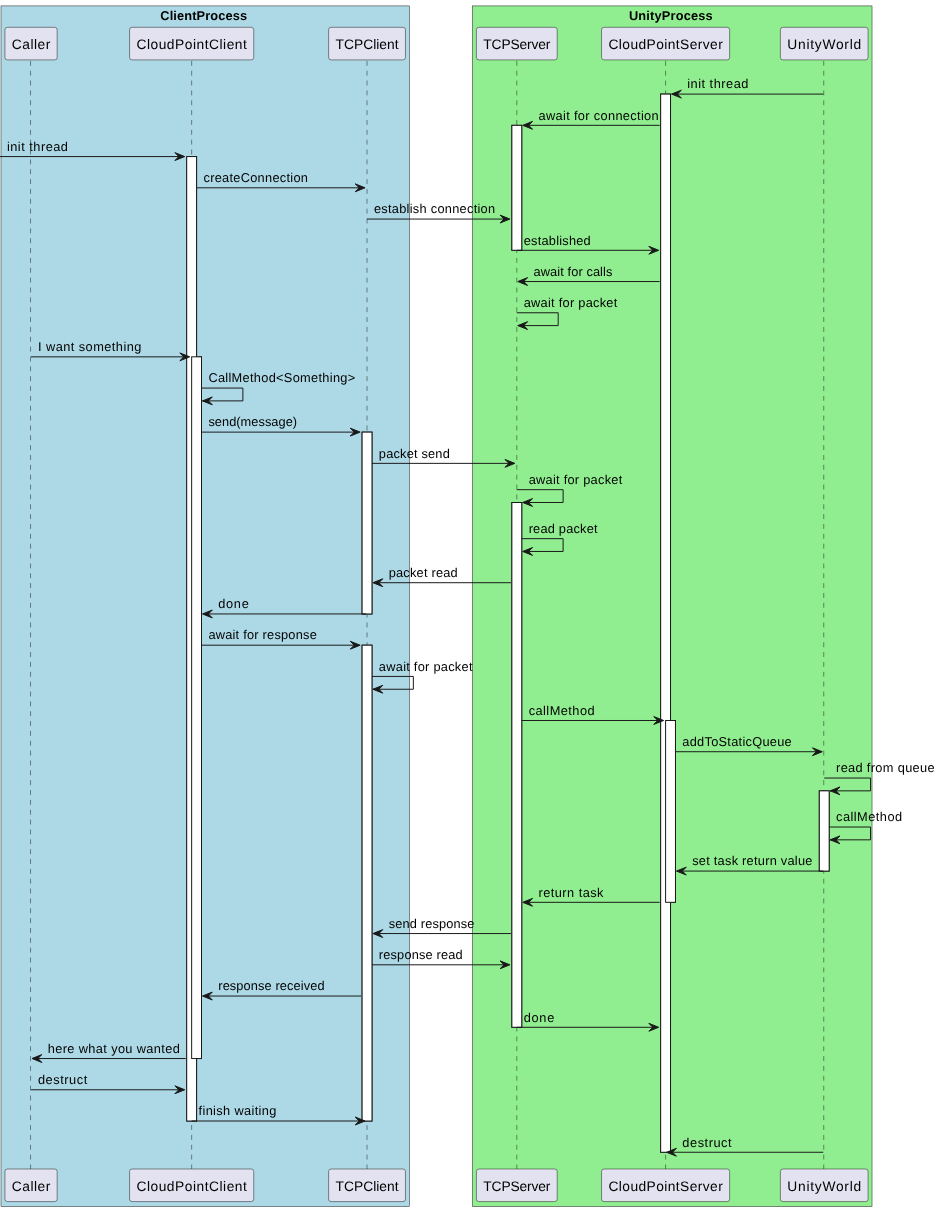
Communication model