Artur Mukhamadiev
162c210a7d
Artur Mukhamadiev
162c210a7d
- StereoRectifier wrapping cv::stereoRectify + cv::initUndistortRectifyMap (CV_16SC2 maps)
- PointCloudBuilder with cv::reprojectImageTo3D and depth/NaN filtering
- CloudPointClient high-level facade: connect(), compute_cloud() -> std::expected<PointCloud, Error>
- write_ply() ASCII PLY export helper
- CLI options 4 (compute-cloud) and 5 (compute-cloud + save PLY)
- Fix TcpServer to loop over multiple requests per connection
- Expose num_disparities parameter through CloudPointClient and StereoMatcherFactory
- Unity C# integration design spec
- Sync README, AGENTS, openwiki with stereo pipeline (C++23)
- E2E synthetic-scene test with constant-disparity stereo pair

TG-9 #ready-for-test
TG-4 #ready-for-test
TG-2 #in-progress
Cloud Point RPC
Communication JSON RPC protocol and implementation with Unity Scene.
Project Structure
include/: Header files for the RPC server, TCP server, and C-API.src/: Implementation of the RPC logic, networking, and C-API.src/cloud_point/: OpenCV-based image processing and rectification logic.docs/: Documentation diagrams and models.subprojects/: Dependencies managed by Meson.
Status
- Server implementation with C-API for Unity
- OpenCV stereo client (StereoRectifier, PointCloudBuilder, CloudPointClient facade)
- Unity-side C# implementation per docs/unity-integration.md
API Documentation
See API.md for detailed request/response formats.
Pipeline
Unity acts as a data source: it serves stereo image pairs (get-image-pair) and full stereo calibration (get-stereo-calibration) over JSON-RPC 2.0. The C++ CloudPointClient calls connect() once to fetch calibration, then on each compute_cloud() call it fetches a synchronised image pair, runs stereo rectification (StereoRectifier, cv::stereoRectify + remap), computes disparity with SGBM (16× scaling), reprojects to 3-D with cv::reprojectImageTo3D (PointCloudBuilder), filters NaN/invalid points, and returns a PointCloud. An optional write_ply() helper serialises the result to disk.
See API.md for wire schemas and docs/unity-integration.md for the Unity C# design spec.
Development
The project uses Meson build system and C++23.
Dependencies
- Meson (>= 1.1.0), Ninja
- GCC/Clang (C++23 support)
- Git (for subprojects)
- OpenCV 4 (optional; required for stereo point cloud compute)
The following dependencies are managed via Meson subprojects:
- ASIO (Networking)
- nlohmann/json (JSON serialization)
- yaml-cpp (Configuration loading)
- glog (Logging)
- jsonrpccxx (JSON-RPC 2.0 implementation)
Build & Run
meson setup build
meson compile -C build
./build/src/cloud_point_rpc_server config.yaml
Note: You need a config.yaml file. See config.yaml.example for the required format.
Run the interactive CLI client:
./build/src/cloud_point_rpc_cli config.yaml
CLI menu options (OpenCV options are hidden when built without opencv4):
| Option | Action |
|---|---|
| 1 | List available RPC methods |
| 2 | Get intrinsic params (legacy) |
| 3 | Get extrinsic params (legacy) |
| 4 | Compute point cloud — prints point count and bounding box |
| 5 | Compute point cloud and save to output.ply |
| 0 | Exit |
Build on windows
It's assumed that you have GCC and make/ninja installed on your system (and available in PATH)
## FIRST OF ALL!
git submodule init
git submodule update
# Next python:
python3 -m venv .\venv
.\venv\Scripts\Activate.ps1
# or
.\venv\bin\Activate.ps1
pip install meson cmake
meson setup -Ddefault_library=static build
meson compile -C build
# To correctly get dlls:
meson devenv -C build
## .\build\tests\unit_tests < for dummy test
## .\build\src\.. < produced execs and libs
Testing
meson test -C build -v
Docker
You can build and run the cli using Docker.
1. Build Image
docker build -t cloud-point-rpc .
2. Run Container
The cli will try to connect to a running server on ip and port defined in config.yml file. (defined in config.yaml inside the image).
For simplicity, it's better to use a host network, so you will not have any headache with accessability.
Server is not configured to run through container, if you need, contact me
You also can mount your own config.yaml to override the default settings:
docker run --network=host -it -v $(pwd)/my_config.yaml:/app/config.yaml cloud-point-rpc
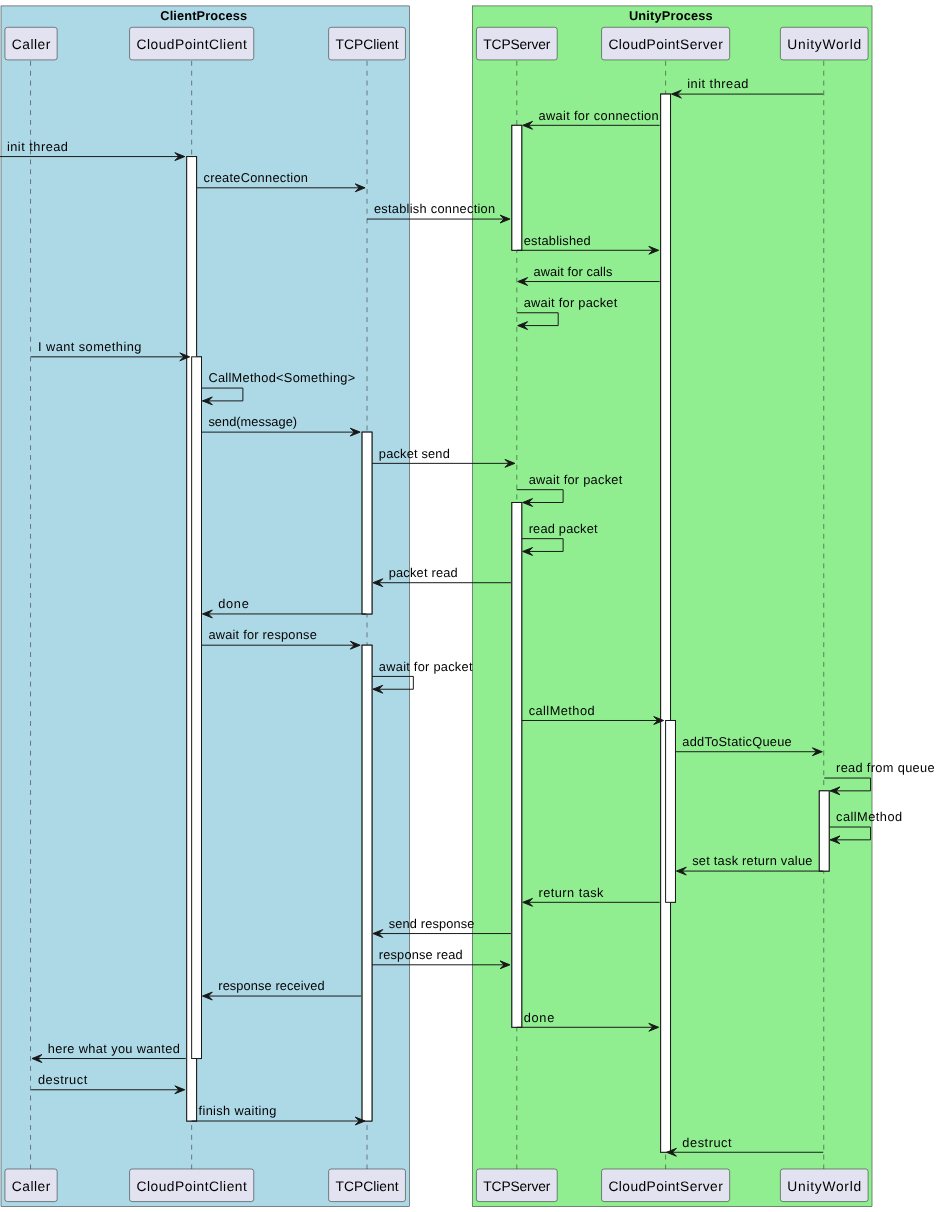
Communication model